

✨ Read the tutorial explaining all available statuses.
✨ Read the tutorial on how to change a status.
🔄 Typical Status Workflow
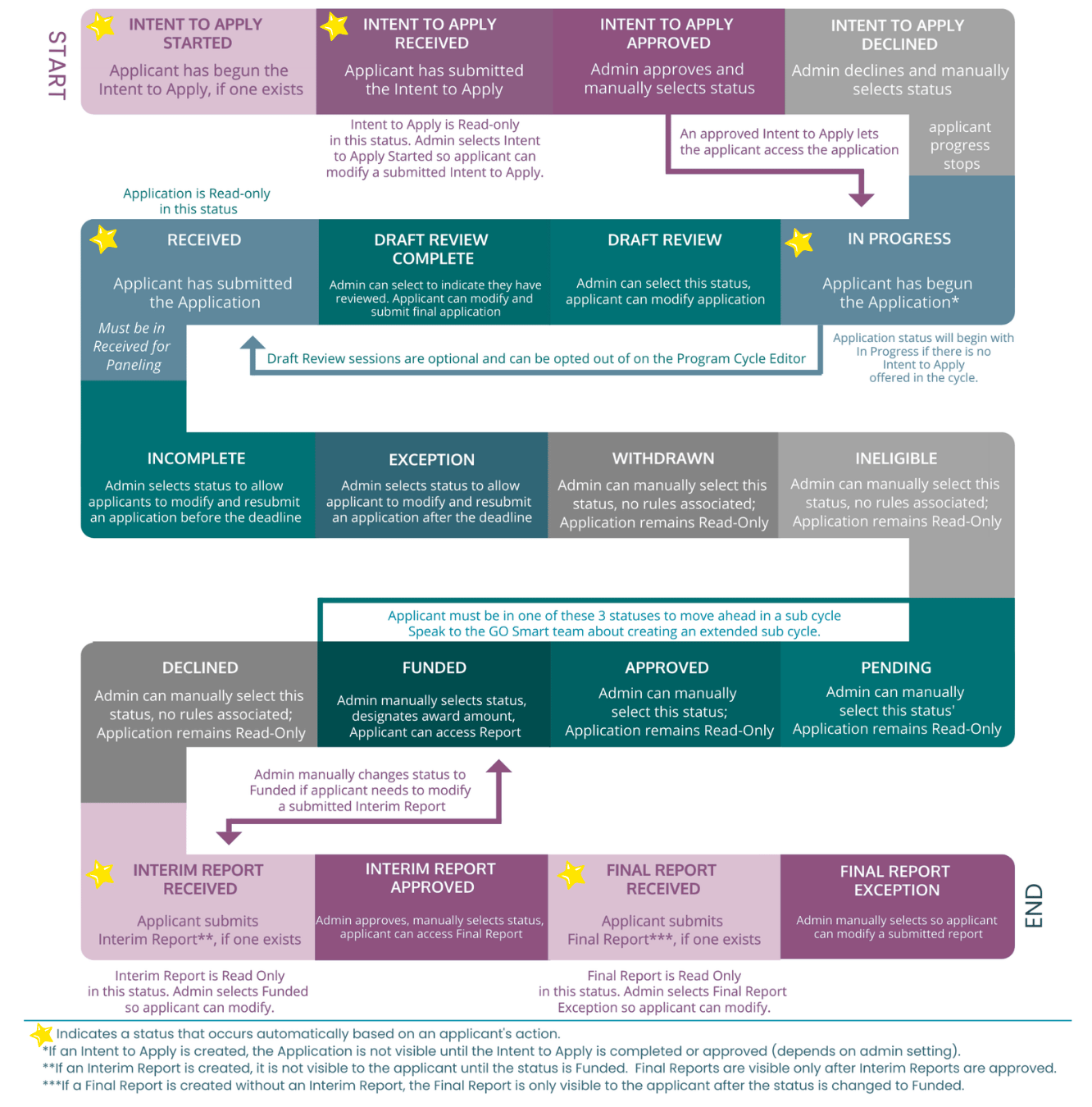
👉 Click here to view a text-only version!
🚦 Understanding the Application Workflow
🟣 Phase 1: Intent to Apply (Optional)
If your cycle includes an initial vetting stage, the applicant moves through these markers:
Intent to Apply Started: The applicant has begun the form. ➡️
Intent to Apply Received: Form is submitted and read-only. ➡️
Intent to Apply Approved: An admin manually grants access to the full application. ➡️
Intent to Apply Declined: The process stops here for the applicant. 🚫
🔵 Phase 2: The Application Stage
Once the full application begins, the workflow follows this typical path:
In Progress: The applicant has started the application and is currently working. ➡️
Received: The applicant has submitted the form. It is now read-only and ready for paneling. ➡️
Draft Review / Draft Review Complete: Optional statuses used if admins provide feedback before final submission. ➡️
Handling Outliers:
Incomplete: Admin allows the applicant to modify and resubmit before the deadline. ↩️
Exception: Admin allows the applicant to modify and resubmit after the deadline. ↩️
Withdrawn / Ineligible: Administrative designations that move the application out of the active pool. 🚫
🟡 Phase 3: The Decision Stage
After review, applications are moved into final determination statuses:
Funded: Admin can designate an award and will grant access to future reports. ➡️
Approved / Pending: Manual statuses for applications that are successful but may have further steps. ⏸️
Declined: The application remains read-only, and the process ends. 🚫
🟢 Phase 4: Post-Award Reporting
For funded applicants, the cycle continues through reporting requirements:
Interim Report Received: The applicant has submitted their Interim Report. ➡️
Interim Report Approved: Admin approves the report, granting the applicant access to the Final Report. ➡️
Final Report Received: The applicant submits their final project data. 🏁
Final Report Exception: Admin allows a modification to a submitted final report. ↩️
💡 Tips:
To reopen an Intent to Apply, change the status back to Intent to Apply Started.
If an applicant needs to continue working on their application after submission or after the deadline, set their form status to Incomplete (before the deadline) or Exception (after the deadline). Confirm that the cycle is set to Show first.
To allow the applicant to edit the Interim Report, move them back to the Funded status.
To allow the applicant to edit the Final Report, and there is NOT an Interim Report, move them back to the Funded status during the designated date range.
To allow the applicant to edit the Final Report, and if there is an Interim Report, move them back to the Interim Report Received status.
